¶ Router MT1-LAB-CORE
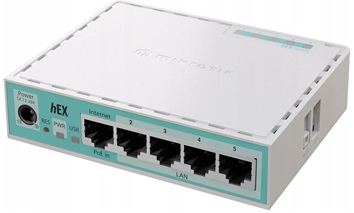
¶ MikroTik hEX refresh (E50UG) – Specyfikacja
| Kategoria | Parametr | Wartość / Opis |
|---|---|---|
| Ogólne | Produkt | MikroTik hEX refresh |
| Kod produktu | E50UG | |
| Architektura | ARM 32‑bit | |
| System operacyjny | RouterOS v7 | |
| Licencja RouterOS | Level 4 | |
| Wymiary | 113 × 89 × 28 mm | |
| MTBF | ~100 000 h przy 25°C | |
| Temperatura pracy | −40°C … +70°C | |
| CPU / RAM / Pamięć | CPU | EN7562CT (ARM dual‑core) |
| Taktowanie CPU | 950 MHz | |
| Liczba rdzeni | 2 | |
| Wątki CPU | 2 | |
| RAM | 512 MB | |
| Pamięć masowa | 128 MB NAND | |
| Zasilanie | Liczba wejść zasilania | 2 (DC jack, PoE‑IN) |
| Napięcie DC (gniazdo) | 12–28 V | |
| PoE‑IN | Passive PoE, 12–28 V | |
| Max pobór mocy | 10 W | |
| Max pobór mocy (bez dodatków) | 4 W | |
| Chłodzenie | Pasywne | |
| Porty Ethernet | Porty 10/100/1000 Ethernet | 5 × RJ45 (Gigabit) |
| Układ switcha | EN7523 | |
| Porty dodatkowe | USB | 1 × USB Type‑A (max 1 A, power reset) |
| Porty SFP | brak | |
| Sloty kart pamięci | brak | |
| Port szeregowy | brak | |
| Funkcje sprzętowe | Monitor temperatury CPU | tak |
| Monitor temperatury PCB | tak | |
| Monitor napięcia | tak | |
| Przycisk Mode | tak | |
| Certyfikaty | Certyfikacja | CE, EAC, RoHS |
| Klasa IP | IP20 | |
| W zestawie | Zasilacz | 24 V 0.38 A DC |
| Inne | Urządzenie z preinstalowanym RouterOS |
¶ 🎯Rola MT1 w labie
MT1-LAB-CORE pełni funkcję głównego routera i bramy dla całego środowiska labowego. Jest to:
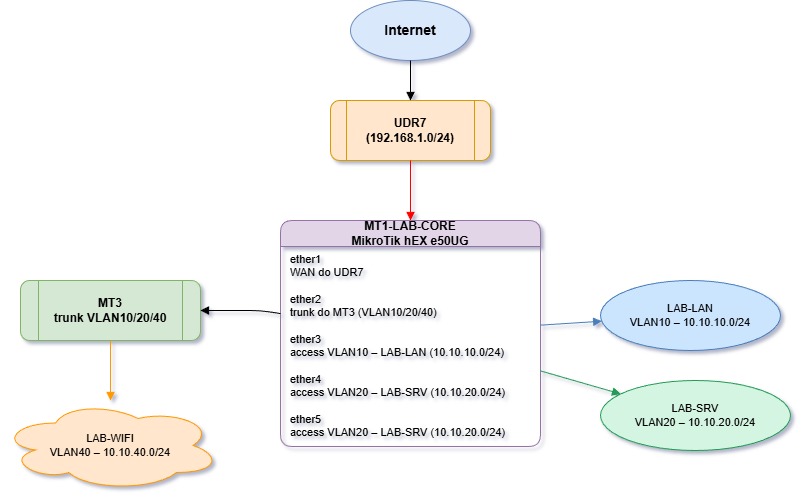
Router brzegowy – łączy lab z siecią główną (UDR7) przez WAN,
Gateway dla VLANów – obsługuje routing między podsieciami LAB-LAN, LAB-SRV, LAB-WIFI,
DHCP server – rozdaje adresy IP w każdym VLANie,
NAT gateway – maskuje ruch wychodzący z laba na WAN (masquerade),
Trunk switch – przekazuje VLANy do innych urządzeń (MT3, AP).
¶ 📐Architektura sieci
¶ 🔧Konfiguracja MT1 – szczegóły
¶ 3.1. Interfejsy fizyczne
| Port | Rola | Tryb | VLAN(y) | Opis |
|---|---|---|---|---|
| ether1 | WAN | – | – | Połączenie do UDR7 (DHCP client) |
| ether2 | Trunk do MT3 | trunk | 10, 20, 40 (tagged) | Przekazuje wszystkie VLANy |
| ether3 | Access LAB-LAN | access | 10 (untagged) | Klienci LAB-LAN |
| ether4 | Access LAB-SRV | access | 20 (untagged) | Serwery / usługi (np. rpi5) |
| ether5 | Access LAB-SRV | access | 20 (untagged) | Dodatkowy port dla LAB-SRV |
¶ 3.2. Bridge i VLANy
- Bridge
bridge-lab - Typ: switch logiczny (VLAN-aware bridge w RouterOS v7).
- Członkowie: ether2, ether3, ether4, ether5.
- Funkcja: agreguje porty i obsługuje VLANy.
Interfejsy VLAN na bridge-lab
| Interfejs VLAN | VLAN ID | Adres IP (GW) | Podsieć | Rola |
|---|---|---|---|---|
| vlan10-lab | 10 | 10.10.10.1/24 | 10.10.10.0/24 | Gateway dla LAB-LAN |
| vlan20-lab | 20 | 10.10.20.1/24 | 10.10.20.0/24 | Gateway dla LAB-SRV |
| vlan40-lab | 40 | 10.10.40.1/24 | 10.10.40.0/24 | Gateway dla LAB-WIFI |
¶ 3.3. DHCP serwery
MT1 działa jako DHCP server dla każdego VLANu:
| DHCP Pool | Interfejs | Zakres IP | Gateway | DNS |
|---|---|---|---|---|
| dhcp-vlan10 | vlan10-lab | 10.10.10.100–200 | 10.10.10.1 | 10.10.20.10* |
| dhcp-vlan20 | vlan20-lab | 10.10.20.100–200 | 10.10.20.1 | 10.10.20.10* |
| dhcp-vlan40 | vlan40-lab | 10.10.40.100–200 | 10.10.40.1 | 10.10.20.10* |
*DNS wskazuje na Pi-hole (10.10.20.10), który działa w VLAN20 (LAB-SRV).
¶ 3.4. NAT (masquerade)
/ip firewall nat
add chain=srcnat out-interface=ether1 action=masquerade comment="NAT lab -> WAN"
- Źródło: cały ruch z VLANów 10, 20, 40.
- Cel: ether1 (WAN do UDR7).
- Efekt: urządzenia w labie mają dostęp do Internetu przez UDR7.
¶ 3.5. Routing
MT1 routuje między VLANami:
VLAN10 ↔ VLAN20 – np. klienci LAB-LAN mogą pingować serwery w LAB-SRV.
VLAN20 ↔ VLAN40 – serwery mogą obsługiwać WiFi.
Wszystkie VLANy → WAN – przez NAT na ether1.
Domyślna trasa:
/ip route
add dst-address=0.0.0.0/0 gateway=<DHCP-gateway-from-UDR7> comment="Default via UDR7"
¶ 3.6. Firewall (podstawowy)
Typowa konfiguracja dla laba:
/ip firewall filter
# Akceptuj established/related
add chain=input connection-state=established,related action=accept
add chain=forward connection-state=established,related action=accept

# Akceptuj ICMP (ping)
add chain=input protocol=icmp action=accept

# Akceptuj dostęp do routera z LAB-LAN i LAB-SRV
add chain=input in-interface=vlan10-lab action=accept
add chain=input in-interface=vlan20-lab action=accept

# Blokuj resztę na input
add chain=input action=drop comment="Drop all other input"

# Forward między VLANami – domyślnie accept (lab)
add chain=forward action=accept comment="Allow inter-VLAN routing"
Uwaga: W środowisku produkcyjnym warto dodać bardziej restrykcyjne reguły (np. izolacja VLAN40 od VLAN10).
¶ 🔗 Integracja z resztą laba
¶ MT3 (switch / AP)
- Podłączony do
ether2(trunk). - Odbiera VLANy 10, 20, 40 i rozdziela je na porty access lub WiFi.
¶ rpi5 (serwer Docker)
- Podłączony do
ether4lubether5(VLAN20, LAB-SRV). - Statyczny IP:
10.10.20.10. - Usługi: Pi-hole (DNS), Traefik, Portainer, Gitea, monitoring.
¶ Klienci LAB-LAN
- Podłączeni do
ether3(VLAN10). - Otrzymują IP przez DHCP (10.10.10.100–200).
- DNS → Pi-hole (10.10.20.10).
¶ WiFi (LAB-WIFI)
- VLAN40 przekazywany przez trunk (
ether2) do MT3/AP. - Klienci WiFi w
10.10.40.0/24.
¶ 📋 Podsumowanie – kluczowe funkcje MT1
| Funkcja | Opis |
|---|---|
| WAN Gateway | Łączy lab z siecią główną (UDR7) przez ether1 (DHCP client) |
| Inter-VLAN Routing | Routuje między VLAN10, VLAN20, VLAN40 |
| DHCP Server | Rozdaje IP w każdym VLANie |
| NAT (masquerade) | Maskuje ruch wychodzący z laba na WAN |
| VLAN Trunk | Przekazuje VLANy do MT3 (ether2) |
| DNS Redirect | DHCP wskazuje na Pi-hole (10.10.20.10) jako DNS |
| Firewall | Podstawowa ochrona + kontrola dostępu do routera |
¶ 🚀 Następne kroki
- Weryfikacja konfiguracji:
/interface bridge print
/interface vlan print
/ip address print
/ip dhcp-server print
/ip firewall nat print
- Testy łączności:
- Ping z klienta VLAN10 →
10.10.20.10(Pi-hole). - Ping z rpi5 (VLAN20) →
8.8.8.8(Internet). nslookup portainer.labz klienta → powinno zwrócić10.10.20.10.
- Backup konfiguracji:
/system backup save name=MT1-LAB-CORE-$(date +%Y%m%d)
/export file=MT1-LAB-CORE-config